WHMCS plugin · v1.0.0

Duck Stats for WHMCS — turn server uptime into a hosting product.

Drop in our WHMCS addon and every server you sell appears in the admin panel with live up/down status. Each logged-in client sees only the monitors mapped to the products, servers, or client groups they actually own. Free to use with any Duck Stats plan — your tier caps how many monitors you can expose (50 / 200 / 1000 / unlimited).

Request a license → requires WHMCS ≥ 8.0 · PHP ≥ 8.1
Duck Monitor walkthrough: admin assigns monitors to products, client sees per-server status
Admin assigns monitors → client sees per-server uptime, response time, 90-day history
01 · What it looks like

Three screens. Zero theme hacks.

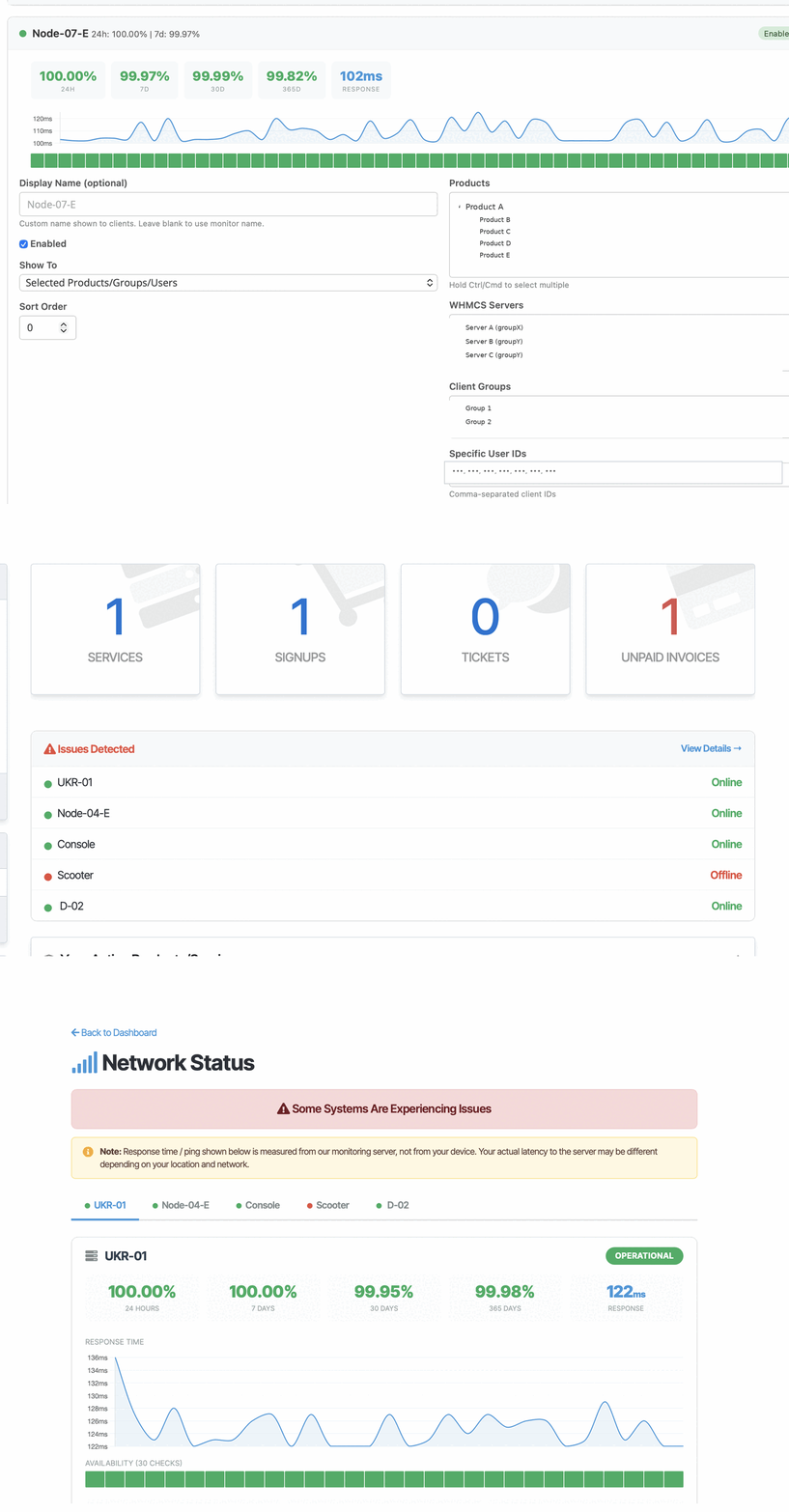
All three render inside your WHMCS shell — admin sidebar, client portal, dashboard widget. No template overrides required.

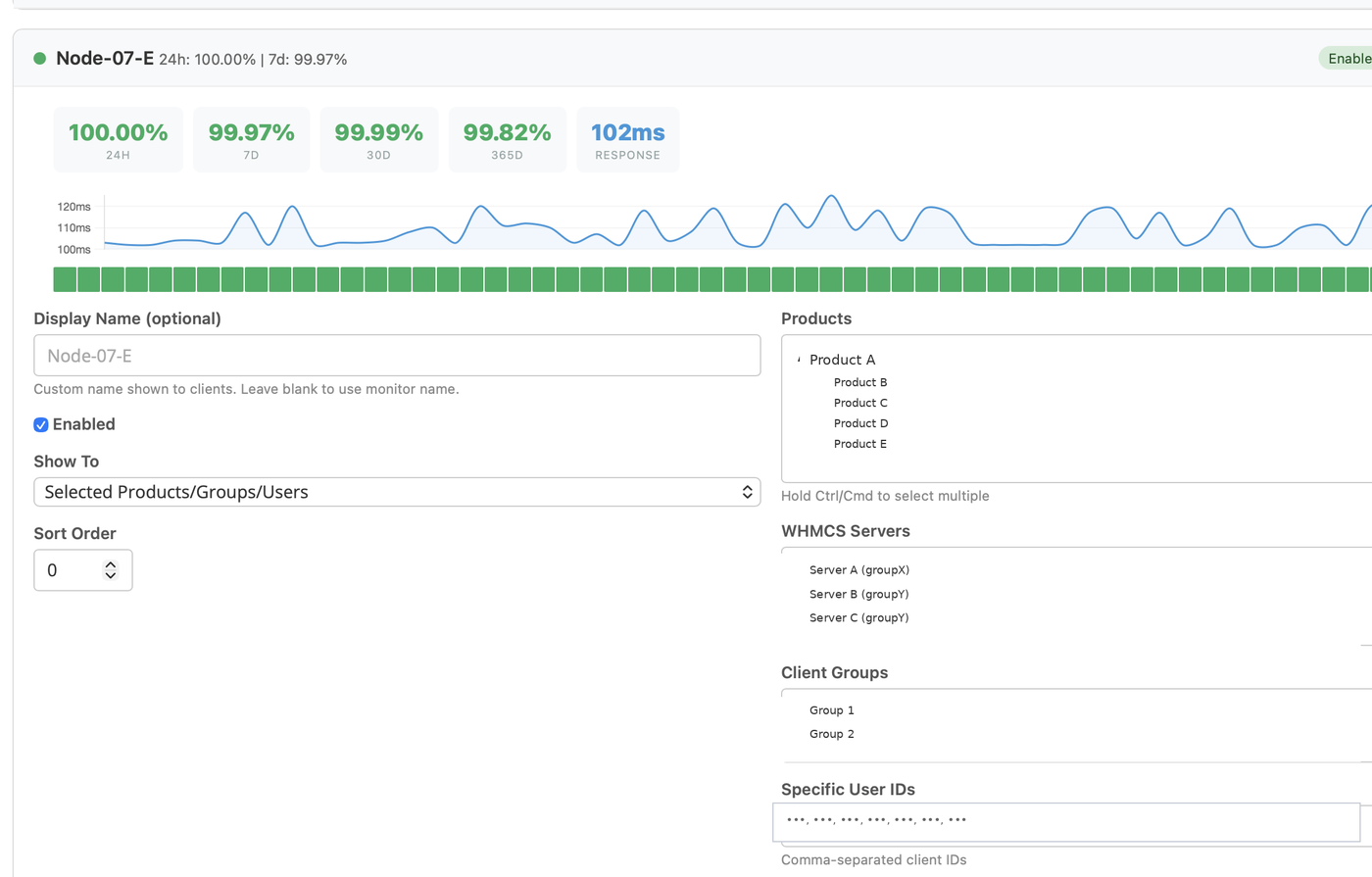
Admin: per-monitor edit panel with uptime tiles, heartbeats and product mapping
Admin · per-monitor mapping (products, servers, groups, user IDs)
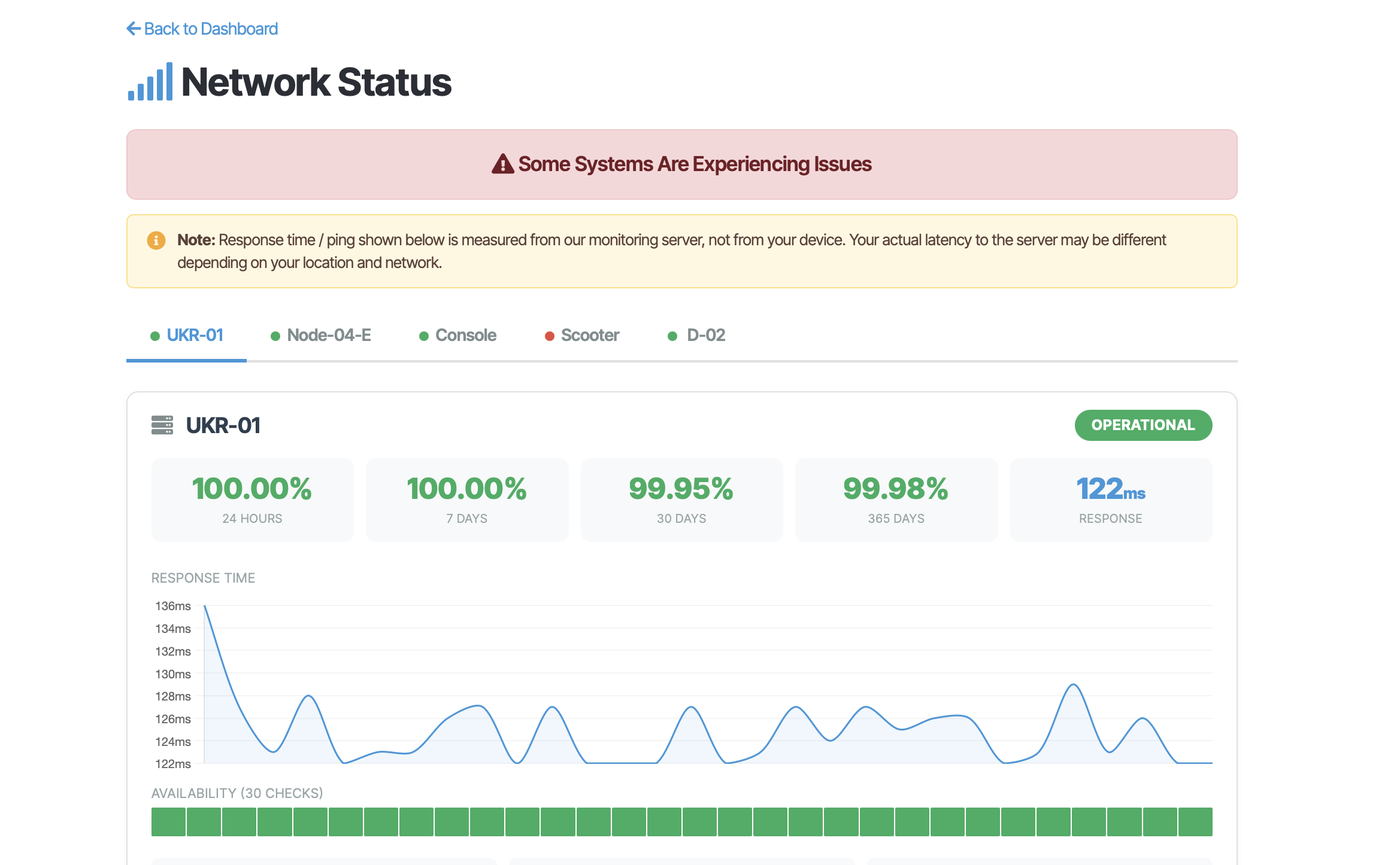
Client: Network Status page with uptime percentages, response chart and heartbeat strip
Client · Network Status (only their entitled monitors)
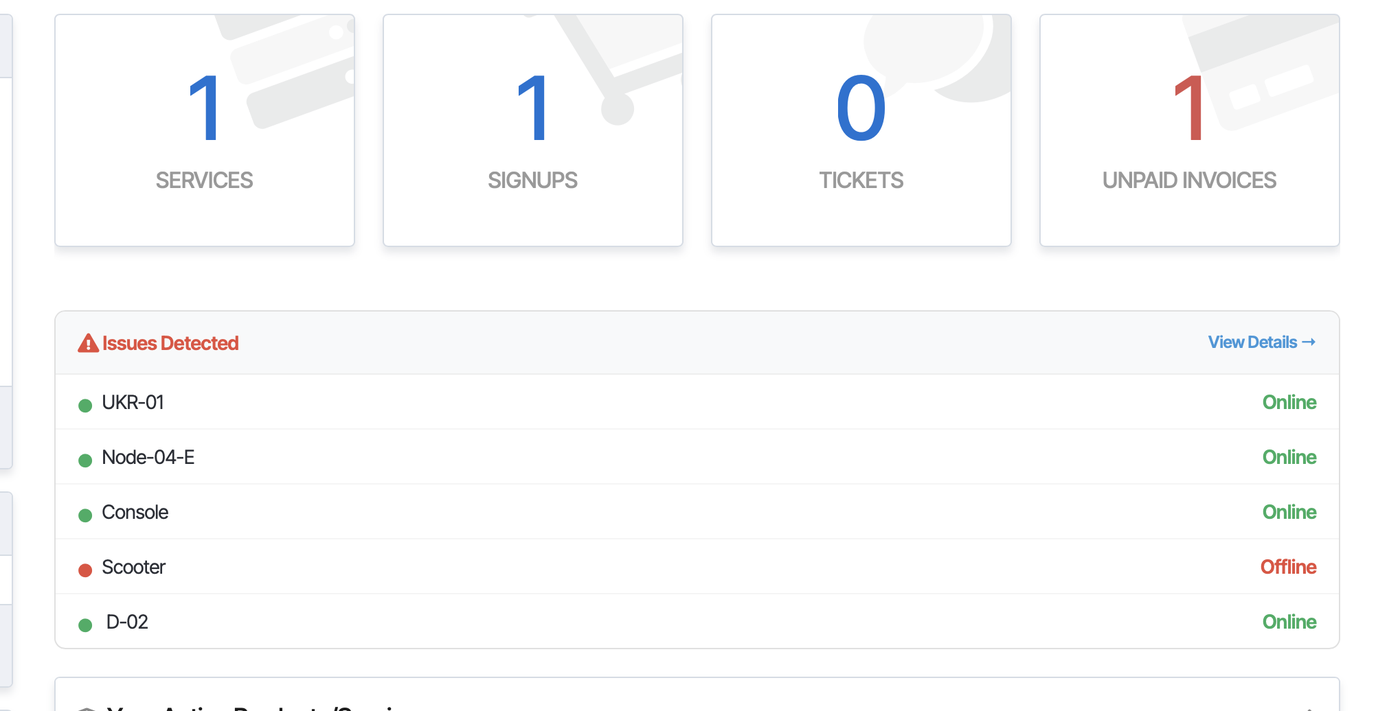
Client dashboard: Issues Detected card lists each monitor with Online / Offline status
Client dashboard · Issues Detected card on home
02 · Features

Everything Duck Monitor does, in plain English.

Auto-sync from your Duck Stats account

Plugin reads monitors from a status-page slug via your Duck Stats API key. New monitors appear in the admin grid automatically on every page load — no manual sync button to babysit. A Sync from Duck Stats button is there if you want to force one.

Per-monitor product mapping

Each monitor can be set to All Users, or restricted by any combination of WHMCS products, servers (tblservers), client groups, or a free-form list of client IDs. Visibility is a union — a monitor shows if any rule matches.

Per-client filtered view

A logged-in client gets a Network Status menu entry at /index.php?m=duckmonitor. They only see the monitors tied to their active services / addons / group. No leakage between customers.

Rich per-monitor detail

Up/Down/Paused pill, 24h / 7d / 30d / 365d uptime tiles, last-ping latency, a Chart.js response-time mini-chart, and a heartbeat strip of the last 30 checks.

Custom display names

Rename a monitor for client display without touching the original. Useful when your internal name is node-07-fra-emby but you want clients to see Frankfurt Streaming Node.

Sort order & enable toggle

Order monitors with a numeric sort field. Temporarily hide one without deleting the mapping via a per-row Enabled checkbox.

Cached for low API cost

Monitor list is cached in WHMCS for a configurable interval (default 2 min). Raise it to drop Duck Stats API calls on a busy portal; lower it for near-real-time freshness.

Public or logged-in visibility

Switch the entire panel between loggedin (default) and public. Public mode turns your WHMCS into a customer-facing status page that lives at your-billing-host/index.php?m=duckmonitor.

License-gated, never crashes WHMCS

Phones license.duckingstats.com once per 7 days. If the license server is unreachable, plugin keeps working for a 30-day grace window. If the license is invalid, the panel renders a friendly box — your billing pages keep working.

Bulk & AJAX saves

A single Save All writes every mapping in one POST, or save a single monitor in place via AJAX. Both paths are CSRF-protected via WHMCS's admin session.

Activity-log breadcrumbs

All failures (license curl errors, API non-200s, bad JSON) are written to WHMCS's Utilities → Logs → Activity Log with the duckmonitor: / duckmonitor api: prefix.

Clean uninstall

Hit Deactivate and both internal tables (duck_monitor_map, duckmonitor_license) are dropped. Then delete the module folder. No leftover schema, no leftover settings.

License-gated install

Plugin zip is issued per WHMCS install — not a public download. Each install is bound to one hostname; the panel runtime checks back to license.duckingstats.com every 7 days.

03 · Requirements

If your WHMCS runs, the plugin runs.

No exotic extensions. Just cURL and outbound HTTPS.

WHMCS

≥ 8.0
Tested on 8.10 / 8.11 / 8.12 / 8.13

PHP

≥ 8.1
8.1 · 8.2 · 8.3

MySQL

≥ 5.7
or MariaDB ≥ 10.3

PHP ext

curl, json
Both shipped by default

Outbound

stats.duckingstats.com
license.duckingstats.com
:443 HTTPS

License

per WHMCS install
One license = one hostname. We email you the zip + license key after request.
04 · Install

From zip to live in 5 minutes.

  1. Request your license + plugin zip

    Email [email protected] with your WHMCS hostname. We email back your license key + a signed one-time download link tied to that hostname.

  2. Upload to your WHMCS install

    Unzip and upload so duckmonitor.php lands at /modules/addons/duckmonitor/duckmonitor.php. The whole tree:

    modules/addons/duckmonitor/
      duckmonitor.php
      install.php
      lib/{License,ApiClient,ServerSync,ClientPanel}.php
      templates/status.tpl
      lang/english.php
  3. Activate in WHMCS

    WHMCS Admin → Setup → Addon Modules → find Duck MonitorActivate. The activate hook auto-creates the duck_monitor_map and duckmonitor_license tables.

  4. Paste two keys into Configure

    Open Duck Monitor → Configure and fill in:

    • License Key — format DS-XXXX-XXXX-XXXX-XXXX, from your Duck Stats account.
    • Duck Stats API Key — generate at stats.duckingstats.comSettings → API Keys.
    • Status Page Slug — which Duck Stats status page to read monitors from.

    Grant Access Control to the admin role(s) that should see the addon page.

  5. Map monitors to products

    Open the addon page (sidebar → Duck Monitor). For each monitor, pick All Users or Selected, then tick the products, servers, groups or client IDs that should see it. Hit Save All. Done.

05 · Licensing

Two keys, by design.

A license key activates the plugin. A separate API key reads your Duck Stats account. Keeping them apart means you can roll either one without re-activating the other — rotate API keys quarterly without touching the license.

  • License check fires once per 7 days per WHMCS install.
  • 30-day offline grace — if our license server is unreachable but you had a recent OK, the plugin keeps serving monitors.
  • The fingerprint is sha256(whmcs_install_id || hostname) — one license, one install.
  • Revoked or expired? The panel renders a friendly “License invalid” box. Your WHMCS itself never breaks.
POST license.duckingstats.com/v1/check
{
  "license_key": "DS-8CC4-61A7-1704-7897",
  "fingerprint": "a4d2f3...e91c",
  "plugin_version": "1.0.0"
}

← HTTP 200
{
  "active": true,
  "tier": "pro",
  "message": "OK"
}

# cached 7 days; 30-day offline grace.
06 · Side-by-side

Duck Monitor vs the WHMCS-store status modules.

We benchmarked against two of the most popular WHMCS marketplace modules in the same lane: WS Server Monitoring and WS UptimeRobot Status from whmcsservices.com. Here's what's on the tin.

Capability Duck Monitor WS Server Monitoring WS UptimeRobot Status
Monitoring engineDuck Stats — multi-region probes from our fleetSelf-hosted inside WHMCS — single-region cron in your billing boxPulls from UptimeRobot — single-region pull
Multi-region consensus (kills false alarms)Yes — 4 regions, configurable quorumNo — one box runs the checksNo — UptimeRobot's free plan is single-region
Per-monitor product mappingYes — products, servers, groups, client IDs (union)Yes — product-based packagesYes — products, selected clients, public, logged-in
Push monitors (for boxes behind NAT)Yes — cron heartbeats + process watchersNoNo
DB health inspector (slow queries, replica lag, buffer pool)Yes — MySQL monitor opt-inNo — MySQL = port alive onlyNo
Free tierYes — 50 monitors free foreverNo — license $-paidNo — $29.99 license
SMS alerts to clients (BYO SMS gateway)Partial — we alert you via SMS (BYO Twilio); the WHMCS plugin shows status, doesn't send client SMSYes — member-level SMS opt-in via WS SMS ManagerNo
Auto-open WHMCS ticket on downtimeNo (flagged as a gap) — we alert via email/webhook; auto-ticket on the WHMCS side is on the roadmapYes — ticket auto-created when a monitor goes downNo
Resold monitoring as a product (clients pay you to monitor their sites)No (flagged as a gap) — Duck Monitor surfaces your servers to clients; we don't yet support clients adding their own URLs through WHMCSYes — that's the whole productNo
Public status page outside WHMCSYes — first-class status pages on your own domain, with subscribe + incidentsLimited — inside WHMCS onlyYes — UptimeRobot's own status pages
Live response-time chart per monitorYes — Chart.js, p50/p95/p99BasicBasic
365-day uptime tilesYesNot by defaultNo
Open REST APIYesGET /api/v1/monitors with bearer authLimited — add/edit/delete/up-or-down onlyNo
White-label / multi-brandYes on Team / Enterprise tiersNoNo
Discord status boardYes — per-monitor custom emoji, 90s refreshNoNo
DistributionLicense-bound — one zip per WHMCS hostname, runtime gateLicense-boundLicense-bound · ionCube-encoded
License costIncluded free with any Duck Stats planLicense (varies) · source license extraLicense $29.99 · source $249.99

Comparison reflects publicly listed features on whmcsservices.com as of 2026-06-29. Where they have a feature we don't, we've flagged it in amber so you can ask before you buy. If you need one of those now, email [email protected] — the auto-ticket-on-down case is small.

07 · Who buys this

Three honest fits.

Hosting reseller

Assign your Hetzner FSN1 monitor to the product Premium VPS Frankfurt. Customers on that plan see Frankfurt status without seeing your London or Dallas tiles. Status-driven support tickets drop by half.

Media / IPTV operator

Map your Emby cluster A monitor to the client group Emby Power Users. They get a real-time view of the cluster they pay for; everyone else doesn't see it at all.

SaaS / web-app vendor

Switch the plugin to public visibility and you've got a logged-out-friendly status page right inside your WHMCS shell — no separate subdomain to set up.

08 · FAQ

Common questions before you install.

Where do I get my license key?
After you buy a Duck Stats subscription with the WHMCS add-on, the key shows up in your account at stats.duckingstats.comSettings → License keys. Format: DS-XXXX-XXXX-XXXX-XXXX. While we wire up self-serve checkout, email [email protected] and we'll issue one in under an hour.
Can I use one license on multiple WHMCS installs?
No. Each license is fingerprinted to sha256(whmcs_install_id || hostname) on first check. If you need to monitor two billing portals, you need two licenses — or pay for the Source/Multi-install tier (email us). Moving a single install to a new host is fine; just contact support to reset the fingerprint.
What happens if license.duckingstats.com is down?
Nothing visible. The plugin caches a successful check for 7 days, and honors that cache for a 30-day grace window if our license server can't be reached. Past 30 days offline, the panels render a friendly “unreachable” box — your WHMCS itself keeps working either way.
What data does the plugin send to Duck Stats?
License check sends only {license_key, fingerprint, plugin_version}. Monitor reads pull from your Duck Stats account via your API key — we don't receive WHMCS customer data, invoices, or tickets. The mapping between monitors and your WHMCS products is stored only in your local database (duck_monitor_map).
Can I white-label / hide the “Duck Stats” branding?
On Team and Enterprise tiers, yes — the status page and the WHMCS panel both support replacing the logo, accent color, and footer text. On Free / Pro the panel keeps a tiny “Powered by Duck Stats” mark.
How do I get the plugin?
Email [email protected] with your WHMCS hostname. We reply with your license key + a one-time signed download link bound to that hostname. There's no public download — the zip is issued per install.
How does the per-monitor count limit work?
It's a count against your Duck Stats plan: Free 50 / Pro 200 / Team 1000 / Enterprise unlimited. The plugin only reads from your account — whatever monitors you have on your status page, you can map. Over-limit monitors just don't show up in the Duck Stats API.
Will it slow down WHMCS?
The Duck Stats monitor list is cached in WHMCS for 2 minutes by default (configurable). License-check is once per 7 days, then served from a local row. Per-page-load overhead is one indexed table read. We've measured under 25ms on a stock WHMCS 8.13 install.

Make uptime part of the product.

Five minutes to install, no template hacks, free with any Duck Stats plan.

Email for a license